

Google has started testing an AI-assisted way to configure reports inside Search Console’s Performance section. Instead of manually selecting filters, comparisons, and metrics, users can now describe what they want to analyze in plain language and let Google pre-configure the report for them.
The feature is currently experimental and rolling out to a limited set of sites.
What Google Is Trying to Solve
Anyone who regularly works in Search Console knows the friction: the data is there, but getting to the right combination of filters, date ranges, and comparisons often takes longer than the analysis itself, especially for non-technical users.
The new AI-powered configuration aims to reduce that setup time by translating natural-language requests into report settings automatically.
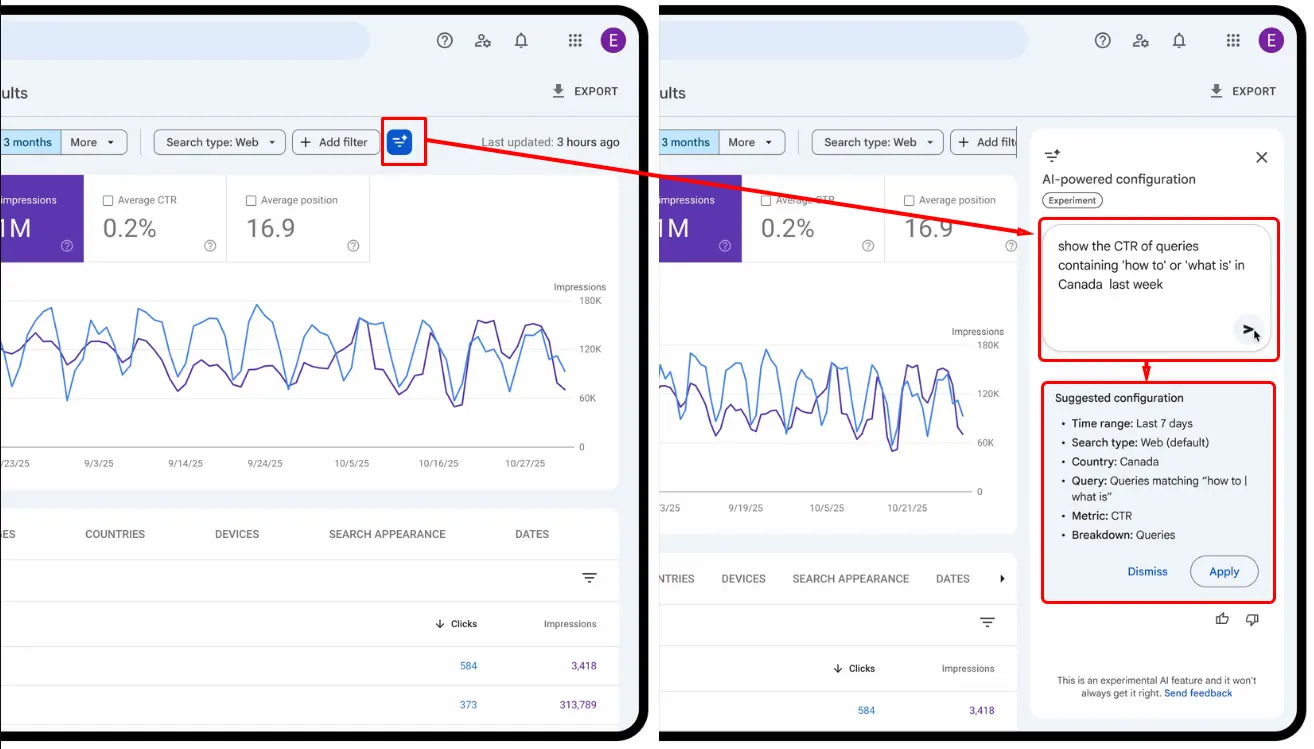
What the AI Configuration Can (and Can’t) Do
At its core, this feature focuses on report configuration, not analysis.
It can help with:
- Applying filters (queries, pages, countries, devices, search appearance, date ranges)
- Creating comparisons, including custom date ranges
- Selecting which Performance metrics are shown
It does not:
- Sort tables
- Export data
- Interpret trends
- Replace manual validation
The output is still a standard Performance report, just configured faster.
How This Fits Into Real SEO Workflows
For experienced SEOs, this feature is less about automation and more about convenience.
Where it helps most:
- Quick exploratory checks
- Ad-hoc questions during reviews or meetings
- Reducing setup friction for junior team members
- Speeding up repetitive report configurations
Where it still needs caution:
- AI can misinterpret intent
- Filters should always be reviewed before trusting conclusions
- Complex edge cases still require manual configuration
Think of it as a shortcut, not a replacement for understanding the data.
Practical Examples: Where This Feature Actually Helps
Rather than relying on demo-style prompts, here are situations where AI-powered configuration is genuinely useful in day-to-day Search Console work.
Quick sanity checks during traffic drops
When traffic drops suddenly, speed matters more than perfect dashboards.
Example use case:
- Compare last 7 days vs previous 7 days
- Filter to mobile traffic only
- Exclude branded queries
This avoids manual setup when you’re trying to confirm whether the issue is device-specific, query-specific, or site-wide.
Exploring content sections without building custom filters
Large sites often rely on URL patterns like /blog/, /guides/, or /resources/.
Example use case:
- Isolate performance for a specific content section
- Compare the current quarter to the previous one
- Focus only on clicks and impressions
This is especially useful during stakeholder reviews where setup time kills momentum.
Country-specific checks without rebuilding reports
International sites frequently need quick regional snapshots.
Example use case:
- View performance for a single country
- Limit results to top queries
- Focus on CTR and average position
Helpful when validating hreflang changes or checking whether visibility gains translate into engagement.
Spot-checking brand vs non-brand visibility
Separating branded and non-branded queries is a common task, and a repetitive one.
Example use case:
- Exclude brand terms
- Compare visibility before and after a campaign
- Focus on impressions and average position
This helps determine whether growth is driven by brand demand or actual discoverability.
Fast answers during live reviews or calls
One of the biggest benefits isn’t analysis, it’s speed.
Example use case:
- During a meeting, someone asks:
“Did mobile traffic change after the last update?” - Instead of clicking through filters, the report is configured in seconds and reviewed live.
This is where the feature feels most useful.
Current Limitations to Keep in Mind
Google is clear that this is an early-stage feature:
- Available only in the Performance report for Search results
- Not supported for Discover or Google News
- Limited strictly to configuration
- Accuracy depends on how clearly requests are phrased
Because of this, it’s best treated as a starting point, not the final step.
What This Signals About Search Console’s Direction
This update fits a broader pattern seen throughout 2025:
- More AI-assisted interfaces
- Less manual configuration
- Lower barriers for non-experts
- Faster access to commonly requested views
As the only first-party analysis platform backed directly by Google Search data, Search Console isn’t changing what it measures; it’s changing how quickly users can access the views they need.
As Google continues experimenting with AI inside Search Console, features like this point toward a future where setup friction fades and insight discovery becomes faster, provided users still understand what they’re looking at.
We’ll keep tracking how these experiments evolve, where they genuinely save time, and where manual control still matters. Stay tuned with PEMAVOR as we continue covering practical Search Console changes and what they mean for real-world SEO workflows. how these changes evolve and where they genuinely improve real-world SEO workflows.